AION 2 Temporary Errors: Find the Failing Login Stage
Separate account verification, launcher connection, world entry and chat failures before trying a reversible fix or filing a useful NC support report.
Record the full error code and where it appears before changing settings. A 40309:500 security-registration report, a server connection failure and a chat “Please Try Again Later” message are different problems. Use the matching branch below; no verified universal 40309 repair was found.
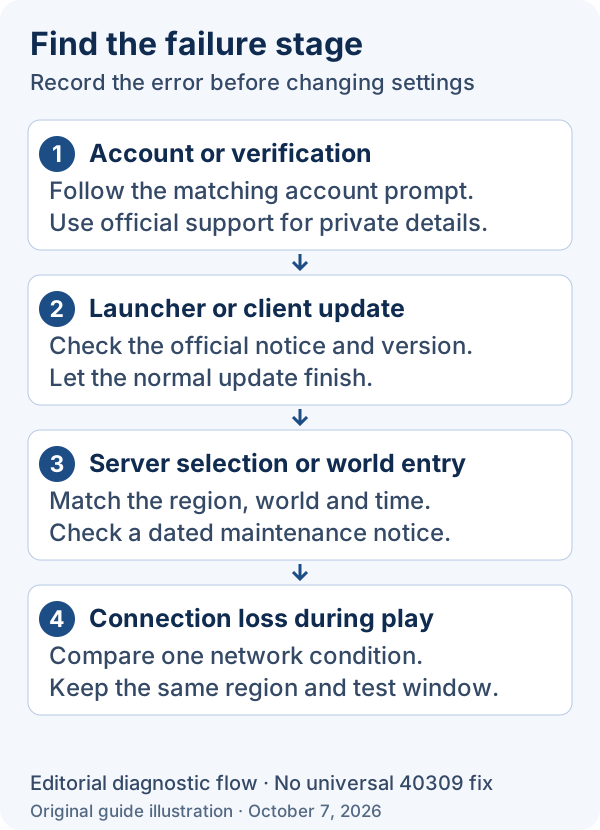
Identify the blocked stage
Swipe or scroll sideways to see all columns.
| Where it appears | Useful next check | What it does not establish |
|---|---|---|
| Account website / phone or device security | Save the exact prompt, full code and country selector; use regional account support | A game-file reinstall fixes registration |
| PURPLE download or update | Record launcher service, update step and retry after relevant maintenance | Your account has permission to play a different service |
| Server selection or world entry | Match region and world to a current official maintenance notice | Every regional server is down |
| Already playing, but chat fails | Use the chat-specific recovery below | A phone-verification or login-server fix |
| The application closes / fatal error | Use NC’s separate crash guide | Every crash is a network timeout |
Use one controlled recovery attempt
- Save the exact text, full subcode, time with timezone, selected region/world and failure stage. Keep a redacted screenshot.
- Check the announcement for that exact service. If maintenance covers the attempt, wait for its announced completion before retesting.
- Close and reopen the affected game or launcher once after recording the symptom; repeat the same action with the same account and world.
- If other internet tasks fail too, follow the connection checks linked below. If only account verification fails, keep the account-support branch.
- Keep the before/after result. A different code or a different stage is new evidence, not proof that the first problem was fixed.
Handle the official chat symptom separately
NC’s October 4 known-issues notice describes a “Please Try Again Later” message when sending chat, with incoming and outgoing chat affected. It names changing characters, crossing a loading screen or logging back in as recovery. Apply that advice to this in-session chat symptom; it is not an official 40309 fix.
Why country swaps and routing tools are not a confirmed repair
The independent IsThisGameDown report places 40309:500 during security or phone registration and distinguishes a 101702 one-time-code/device symptom. Its country-selector and PURPLE-route workarounds are player reports; no general cause or standing fix was established. Do not replace accurate account information merely to reproduce an anecdote.
Send a report that support can act on
For persistent server connection failures, NC asks for your current country, when the problem began and your ISP. Add the exact code, stage, service/world, launcher version and attempted change. Send account identifiers privately through official support; a public screenshot should hide them.
Use the connection guide for local-network checks and the account-verification guide for identity/device/phone prompts. A confirmed region-specific outage belongs in the server-status guide.
- Check the connection before comparing routes
Measure the local path and separate it from game-session latency.
- Account, phone and device verification
Use the service-specific account route.
- Regional maintenance and server notices
Check the relevant service notice.
Sources reviewed October 7, 2026. The stated region and source update date apply to each instruction. No game client, account, redemption, purchase or performance test was performed.
The dated source records and this article’s wording were reviewed on October 7, 2026. “Last checked” means source and editorial review. No current game client, account, installation, purchase or reward delivery was independently tested. Older sources retain their original dates, service regions and version limits.
Common questions
a temporary error has occurred aion 2
First record the full code and stage. Use account support for verification, current notices for world entry, and the separate official recovery only for the in-session chat symptom.
aion 2 error 40309:500
The reviewed independent report associates this with security/phone registration. A universal official cause or repair remains unconfirmed; use the exact service and prompt in an account-support report.
Sources and checks
- reported-error-40309 · independent_error_report Checked Oct 7, 2026
- Advanced Access Known Issues (Updated: 10/4) · official_global_notice Checked Oct 7, 2026
- I keep disconnecting or can't connect to a server. · official_support_faq Checked Oct 7, 2026